0:00
0:00 / 0:00
−0:00
1 / 6
AI Video KitsRemotion elementsSupports Anky AI Easy EditorNewMade with Claude Code

Liquid Glass Lower Thirds — 10 Remotion Titles (MP4 or Transparent)

Ten liquid-glass lower thirds that bend your footage: one JSON, MP4 or alpha overlay.

₹349

Commercial license · GST calculated at checkout

Choose a license
  • Secure instant download
  • 12 months of updates
  • 7-day refund policy
  • Your own licensed copy, with a purchase code

What's included

  • Remotion 4 project with a WebGL glass engine
  • Anky AI Easy Editor: edit in your browser, no code
  • 10 lower-third designs, 1920×1080, 30 fps, 8.6–9.4 s each
  • MP4 over footage, or transparent ProRes 4444 / WebM
  • Design notes: what each holds, which props change it
  • Props schema, JSON Schema, text-width validator
  • Gallery script: all ten designs with your texts
  • Poppins font (SIL OFL), Pexels demo footage, sample avatar
  • Worked example: tinted glass with a photo
  • README, HELP, PREREQUISITES, docs
  • Skills for Claude Code, Codex, Gemini CLI, Cursor, Copilot
  • package-lock.json
Designs
10
Per design
about 9 sec
Aspect
16:9
Works with
Remotion 4, React 19, Node.js 22+
File size
87 MB
Version
v1.1.0
Updated
Sep 28, 2026

Agent-friendly Remotion elements

Two ways to make it yours
an AI agent or the Easy Editor

Hand bigger changes to a coding agent, or make quick swaps yourself in the Anky AI Easy Editor. Both edit the same project.

For advanced changes

Your coding agent

  • Claude Code
  • Codex
  • Gemini CLI
  • AntigravityAntigravity
  • Cursor

Or any agent that reads AGENTS.md. Describe the change in plain words.

“Match design 7 to my channel colours and render a transparent WebM.”

  • New scenes, layouts and animation timing
  • Brand-wide changes in one request
  • It checks stills and renders for you
or

For fast, no-code edits

Anky AI Easy Editor

Double-click Start Editor and it opens in your browser.
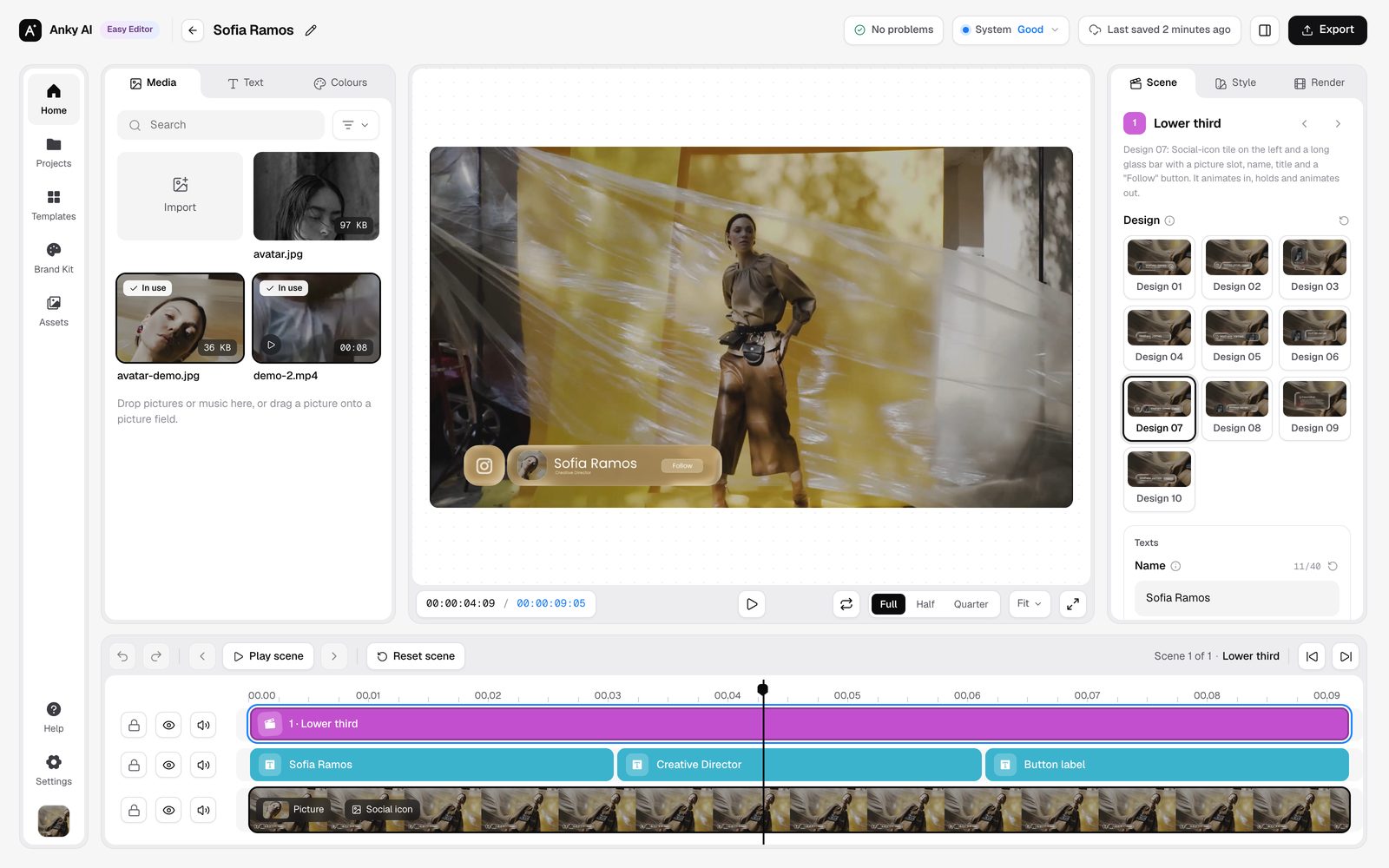
The Anky AI Easy Editor with this template open
  • Pick a design, type the name and title
  • Preview over your own video
  • Render MP4, ProRes 4444 or WebM

AGENTS.md, CLAUDE.md and skills ship inside, so agents know the project from the first prompt. The editor runs on your computer; nothing is uploaded.

What's in the pack

10 designs · 16:9 · about 9 seconds each · works with Remotion 4, React 19, Node.js 22+, Claude Code

10
Designs
~9s
Per design
16:9
Aspect

Design browser

Pick a design to watch it animate, see what it holds and what you can change.

0:00
0:00 / 0:00
−0:00

1. Design 1 · Wide bar with picture and arrow

0:00 · 9s

A wide rounded glass bar: a square picture slot on the left, the name and title, and a round arrow badge on the right. The glass magnifies and bends the footage behind it while the rim catches the light.

What you can change

Change texts.name and texts.title, media (the picture), colors.accent (the arrow), colors.border (the rim); show.media and show.arrow hide the picture or the badge.

Music guide

The lower thirds render without sound; they sit on your footage or your editor's timeline, where your own audio lives.

Technical details

Made with

Claude Code

Model: Claude Opus 5.5

Engine, props, validator, docs and skills written with Claude Code on Claude Opus 5.5.

Easy Editor

Anky AI Easy Editor1.0

Included · no code, no video software

Start
Double-click Start Editor (Mac or Windows)
Designs
Pick from 10 picture cards
Edits
Texts, picture, icon, colours, glass, position
Background
Your video, a picture or none
Output
MP4, ProRes 4444 or WebM alpha, 720p–4K

Runs in your browser on your own computer: nothing is uploaded, no account. Needs Node.js 22.18+.

How to use

Claude Code as editor
Open the folder, add your clip, describe the title. It renders the MP4.
Your video editor
Render with --alpha (ProRes 4444) or --webm; place it above your clip.
Glass look
Render over footage: the glass bends what is behind it.
Ten designs
One props file renders in any design (--design all).

Output

Over footage
MP4 H.264, 30 fps, silent
Transparent
ProRes 4444 .mov or VP9 WebM, alpha
Size
1920×1080 · 720p to 4K
Length
8.6–9.4 s per design
Background
Your video, a still, or none

Preview: all ten at once, then one by one.

Licences

Template
Your ANKY.AI tier
Font
Poppins, SIL OFL
Designs
For videos made with this template only
Demo media
Pexels footage and photos; example Instagram icon (Meta trademark): replace with yours
Remotion
Free up to 3 people; company licence above

About this pack

Liquid glass lower thirds for Remotion: ten animated glassmorphism name titles (1920×1080, 30 fps) for YouTube, interviews, podcasts and social videos.

Pick a design and type the name in the Anky AI Easy Editor or ask an AI coding agent, then render MP4 over your footage or transparent ProRes 4444 and WebM for Premiere Pro, Final Cut Pro, DaVinci Resolve and CapCut.

More from ANKY.AI

View store